Category: JIRA

  • How to Integrate Selenium tests with Jira?

    How to Integrate Selenium tests with Jira?

    Key Challenges Faced by Finance Professionals with the Data

    For finance professionals, data is their real treasure, from data collection to making the final report out of it, their life revolves around Data wrangling. Generating financial reports out of massive financial data takes a lot of time, and accuracy also gets affected. As a result, Power BI is useful for finance professionals as it saves them from the challenges mentioned here:

    1. Data Silos:
    2. It is one of the most prominent problems finance professionals face in data management. Data Silos are disintegrated and separate data managed by various departments of the organization. Fragmented data is the main cause of inefficiency and leads to dissatisfied customer experience.
      Big institutions like American Finances and Investments need automation in their data management system.

    3. Data Accuracy:
    4. As mentioned above, fragmented data into various departments are the reasons why resources and time cannot be optimized to the fullest in the finance sector. The only way data accuracy can be improved is by fixing the errors in the data. Power BI for financial analysis is a practical solution as it will save time and ultimately reduce the workload.

    5. Data Privacy:
    6. Data insecurity and poor data management cause operational disruption, reputational damage, and legal challenges. Finance companies are heavily investing in robust and scalable data management systems as data privacy is their top priority.

    7. Data Scalability:
    8. With the growth of Financial organizations, the volume of data also grows massively. A large amount of data gets a bit complex in management, every day there are tons of new financial events taking place, and similar-looking data lack scalability. By optimizing analytical tools like Power BI for financial reporting data scalability can be increased.

    Identify what is the solution

    The financial sector is heavily dependent on data gathering and storing. Adopting effective data collection, storage, and management systems are the prominent solutions for excellent customer service, strategic decision-making, and competitiveness in the era of technology.

    Data Architecture

    Businesses heightened the need for digitalization with the surge of comprehensive and analytical methods for their flourishing data. Therefore, flexible architectures are technologies intended to improve query performance and handle unstructured data. Although these challenges are exposed to various challenges, including expensive maintenance, and difficulty in scaling.

    Cloud Solution

    Dedicated cloud data warehouses and increased use of SaaS solutions have transformed the entire BFSI data structure. Modern data architecture necessitates thinking about whether data should be stored in a traditional database or another technology that is better suited to the use cases.

    Data Modeling

    There will be many who will wonder why Data modeling is important in the finance sector. Data modeling is the approach of assembling easy-to-understand visuals and layouts of the data to represent the flow. This approach helps organizations organize and arrange data to better understand linkages, patterns, and trends. It enables an organization to use data more efficiently to meet business needs.
    Creating a data model using Power BI is possible. It is a fantastic tool that allows us to share files with clients in PDF or PowerPoint format. Users can generate various scenarios based on their choices in Power BI, although it offers fewer capabilities in comparison to Excel. A major benefit of implementing Power BI is the ability to work with massive databases rapidly.

    Financial Modeling

    What is financial modeling? Financial modeling and Data modeling are excellent approaches in the financial sector. But what differs between these two? Financial modeling is the process of presenting financial data in an Excel sheet to determine future growth and scopes based on previous financial results. This consists of a framework to assist management in making smart choices based on financial reporting.

    Learn how Power BI and Fabric work

    Understanding the constant interaction with data to extract valuable insights for the customers is an inevitable KPI of financial professionals. Power BI a reporting and analytics tool has been a game changer. It extracts data from various data sources and turns it into BI report formats. This analytical tool is notably aiding businesses in anticipating trends, tracking performance, and making data-driven decisions.In our previous blog we have explained the recent launch of Fabric by Microsoft makes the data management game top-notch. Fabric is a complete environment of AI-fueled tools and services on OneLake. Microsoft Power BI and Fabric may seen as similar as these two technologies are data-focused. However, they serve different purposes in the data pipeline. Fabric addresses a wide range of data integration and processing and Power BI focuses on the end-use of your data assets.

    Working on Power BI in Microsoft Teams

    It is convenient to generate reports using Power BI in Microsoft Teams. It allows users to visually represent any data with the help of Power BI service.

    1. Firstly, access the Power BI app from Microsoft Teams.
    2. Then go to Workspace in which you will see the data in the designated file.
    3. Here in the American Finances and Investments Bank’s data is already categorized in the folder. Managing data with accuracy is certainly a challenge for Finance professionals.
    4. For Instance: BFSI professionals need a powerful solution to manage data. Power BI and Fabric provide a comprehensive yet consolidated solution for data management.
    5. Once you click on the file, the interface will open categorizing and segmenting the investment data by Year, Quarter, Month, Week of Month, Symbol, Series, and Day Name.
    6. Users will have access to review all the categories of the pages such as Quick Market Stats.
    7. And lastly, the ribbon button in Power BI allows one to extract data and create a report of it.

    It simplifies the review of specific data out of a wide range of Financial data. This segmentation has dual benefits; data accuracy and speed. Publishing and sharing the reports with clients and colleagues is now easy with the Power BI service.

    Sum Up

    Finance professionals and organizations are heavily dependent on the data to make strategic decisions. This data gets increased abruptly within a short span of time and causes challenges in data management. An individual can’t sort the financial data manually and bring efficiency to the work. However, Microsoft Power BI and Fiber are practical and most appropriate solutions for financial reporting and analysis in such cases. Consider how profitable a business could be if a person could do hours of work in a matter of minutes with a single click. Before Power BI for financial statements, you only had a few clients, but now you have more time and clients. These approaches not only prevent burnout but also provide you with new clients and prospects for success. We at MoreYeahs aim to deliver cutting-edge solutions to businesses. Our teams have seasoned professionals with notable industry expertise in Power BI. Microsoft Power BI and Fabric are the most promising technologies to get accuracy in reporting.


  • Simplifying Data Migration from Gemini to JIRA: A Technical Guide

    Simplifying Data Migration from Gemini to JIRA: A Technical Guide

    Understanding How Data Works

    First things first – before getting technical, let’s get a good look at the data in both Gemini and JIRA. We need to know:

    • What kinds of data are we moving? (like tasks, files, comments, and users)
    • How do the fields match up between Gemini and JIRA?
    • Are there any differences in how they organize data, like special fields or unique codes?

    Planning the Move

    Once we know the data, we can plan how to move it. Here’s the plan:

    1. Get the Data Out: Take the data out of Gemini in a way that we can use.

    2. Change the Data: Make sure the data fits with how JIRA likes things. This might mean changing types of info, matching up fields, and fixing any differences.

    3. Put the Data In: Load the changed data into JIRA, making sure all the info stays correct and connected.

    Choosing Tools

    To make this happen, we need the right tools. Think about:

    • What Language to Use: Something good for working with data and connecting to other programs. People often choose Python because it has lots of helpful tools.
    • Libraries for Working with Data: We can use libraries like Pandas to work with and change the data.
    • Connecting to Gemini and JIRA: Using the special tools (APIs) that Gemini and JIRA give us to move data around.

    Handling the Hard Parts

    Things won’t always go perfectly, so we need to be ready for that:

    • Dealing with Files and Pictures: Making sure they move over okay.
    • Special Fields: Managing any special fields in the data.
    • Fixing Mistakes or Missing Info: Handling any problems that might come up.

    Testing and Checking

    Before we actually move everything, we need to check and test:

    • Testing Pieces: Trying out different parts of our tool to make sure they work.
    • Testing Everything Together: Making sure the whole process works from start to finish.
    • Checking Everything is Right: Making sure the data looks good and matches what we expect.

    Putting It into Action

    When we’re sure everything works, we can put our tool into action:

    • Using the Tool for Real: Actually moving the data for real projects.
    • Watching Closely: Keeping an eye on things to catch and fix any issues.

    In the End

    Moving data from Gemini to JIRA might seem tricky, but with the right plan and tools, it’s doable. By understanding the data, planning the move, picking good tools, handling problems, testing everything well, and keeping a close watch, your team can switch tools without a hitch, keeping everything running smoothly. Let’s connect to discuss your project.

  • MOREYEAHS IMPLEMENTING PROXIMITY THROUGH IOT

    MOREYEAHS IMPLEMENTING PROXIMITY THROUGH IOT

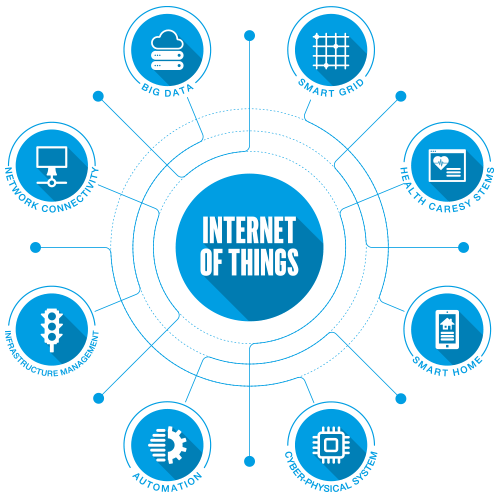
    Summarizing IOT(INTERNET OF THINGS):

    World is at shift of another revolution but this time it is more focused on connecting the physical devices (electronic devices) with internet and interconnecting them together as a result which makes devices smart by collecting the data at real-time and applying analytics on those data to know what’s going in the real world ie is IoT. The Internet of Things (IoT) is a technology that makes every electronic device wirelessly connected to the internet, allowing for data to be extracted from those devices. Some industries are already using IoT in their daily operations; for example, it can be used to automate certain tasks by connecting each step of a process online.

    Real-life IOT Scenarios: You probably have been thinking that how these things will make an impact in real life

    • Considering a simple scenario in which a Beacons(BLE Technology a device which can be attached via Bluetooth usually transmits signals) which are installed in your office attached to your mobile with blue-tooth tracking you via signal’s it’s transmitting for eg when you checkout from office to home data will be sent to cloud from mobile and from cloud to any of your connected appliance to cloud-like coffee machine or toaster so you may have your lunch ready while you reach home.
    • Now adding a little complex one, Consider a you got any problem in your car and you see engine light so device monitoring engine data will trigger and send data to cloud book appointment to near warehouse ask your permission to book appointment not also that cloud also send specific details about fault to manufacturer so it can be analyzed how many customers are facing same problem and cause of it which will improve the manufacturer product quality.
    • More advanced scenarios can be implementing proximity in IoT(internet of things) enabled objects which get them to serve your needs at the right place at the right time. “Team MoreYeahs working in the same direction in which projects included of implementing proximity with IoT and helping bigger industries to manage their assets and improving productivity”.

    Understanding Proximity:

    INTERNET OF THINGS

     In simple terms, Proximity is IOT driven objects which are changing and reacting according to our location. In more depth tracking your location and making your life more easy by knowing what needs do you have.

    Moreyeahs Team is doing the same thing for big corporate giants We are building the platform which implements the proximity(Location tracking of the employees) for the companies in which mass production is done and their production is Labor oriented. As mass production is done so a lot of employees required to be in their places because any employee away from responsibility during working hours causes loss. So tracks of the proximity of each and every employee present at the particular job assigned to them must be kept in check, And work hours are calculated according to it
    For e.g.” Considering a company in which large scale production of mobile manufacturing is done, and it requires a lot of employees to be on their workbench to perform the job such a companies have different department from assembling, packaging, maintenance, etc each department with large number of employees so tracking each employee how much they were on their workbench after checking in could save corporate a lot ”.
    HOW MOREYEAHS DOING IT??: Using latest Beacon Technology and IoT (Internet of Things) clouds platforms Moreyeahs making it into reality. Beacons are used to track your assets and staff “Beacons are Bluetooth based device which is used as a tracking solution which is cost-effective, Robust, Long lasting and very easily integrate solution ”. Beacons are device transmits signals it repeatedly transmits a single signal that other devices can see. Instead of emitting visible light, though, it broadcasts a radio signal that is made up of a combination of A Bluetooth-equipped device like a smartphone can “see” a beacon once it’s in range.

    Working and Role of this Beacons.

    The beacons can be attached to mobile devices using Bluetooth. There can be an app that can be triggered automatically when comes to the effective range of beacons and though Beacons transmits unique signals can perform different functions for different Beacons. The main Role of Beacons is here to collect data and transfer to the cloud. In a production environment, it can be done in different ways every employee has the app installed in the phone and Bluetooth enabled so at every checking and checkout or when the employee is away from workbench every data is collected from the beacons connected and then transferred to the cloud.Role of IOT cloud platform: The IoT platform will help us to manage gateways and location engine for beacons it will help us to subscribe data which are published by beacons and we can use these data to apply analytics and generate reports for each employee. Also, we can use different IoT protocols to trigger different IoT devices to variety on actions based on data. In production scenario we are managing and analyzing data published by apps on the cloud-connected to the beacons

    • Challenges we have overcome: There were a lot of challenges that the team has overcome in the following scenario’s:
    • getting data from beacon itself is a challenging task because it gives more than 60 objects in a minute for a single user and we have to get data from many beacons for many users and also trigger multiple functionalities to be done on that data.
    • Secondly, another challenge that Team is successful in overcoming is that we have to get data from beacons to the database in real-time, beacons are sending data to the cloud continuously so we can’t just use rest-API to call data. The team used latest IoT protocol to get streaming in real-time and putting them in the database.
    • Thirdly we have to pipeline the data and apply analytics in it and generate the report for every employee performance

    Working and Role of this Beacons

    Advantages to our valuable clients:

    • Improve staff productivity by reducing search time for key equipment.
    • Increase asset and space utilization by tracking of occupancy and asset usage.
    • Understand the state and usage patterns of equipment through telemetry information.